Hi Friends, In this post we will see below Page List expression.
PDN help:
https://community.pega.com/sites/default/files/help_v718/definitions/p/pagelist.htm
IsInPageListWhen(whenName, lookIn) - this expression will return true when any one of the pages in page list evaluates to true.
Below is the list of instance in Courses table.

Now when we have to use this expression?
If our requirement is to find any records having department as engineering then we can use this expression.
How we can do that.
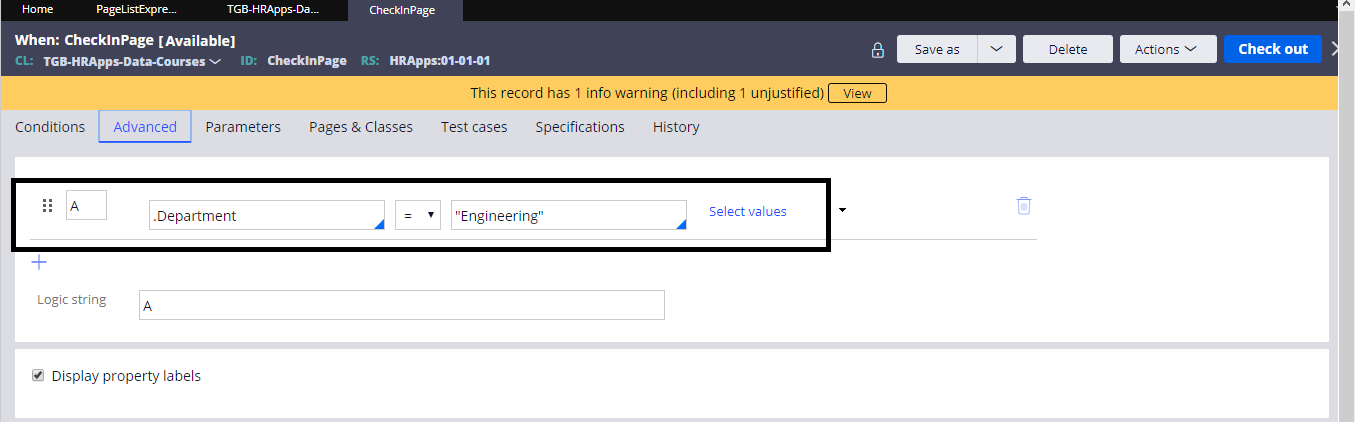
In the when rule we can check .Department = "Engineering"
Activity:

Obj-Browse: to browse list of records from Course table.

In the property set added the expression to check any pages have the match.

Now the above expression will become true when any pages data evaluates to true against the when rule CheckInPage.
When rule: CheckInPage

Now run the activity and check the result in Tracer.

In tracer we can able to see total 10 records retrieved from table. then the when rule become true.
So lets check the parameter(RetValue) in Parameter Page.

Value is true in Tracer.
So this expression completed.
---- **** -----
IsInPageList(lookFor, lookAt, lookIn) - This expression will provide return value true/false.
LookIn - pagelist name in which we have to check.
LookAt- Property in Page.
LookFor- which value we have to check in the property.
In Page List CourseList.pxResults we are checking any pages having department = engineering.
 In tracer we can able to see the parameter value as true.

Other expression we will see in next post. If you have any doubt ask in comment.😊
PDN help:
https://community.pega.com/sites/default/files/help_v718/definitions/p/pagelist.htm
IsInPageListWhen(whenName, lookIn) - this expression will return true when any one of the pages in page list evaluates to true.
Below is the list of instance in Courses table.

Now when we have to use this expression?
If our requirement is to find any records having department as engineering then we can use this expression.
How we can do that.
In the when rule we can check .Department = "Engineering"
Activity:

Obj-Browse: to browse list of records from Course table.

In the property set added the expression to check any pages have the match.

Now the above expression will become true when any pages data evaluates to true against the when rule CheckInPage.
When rule: CheckInPage
Now run the activity and check the result in Tracer.

In tracer we can able to see total 10 records retrieved from table. then the when rule become true.
So lets check the parameter(RetValue) in Parameter Page.

Value is true in Tracer.
So this expression completed.
---- **** -----
IsInPageList(lookFor, lookAt, lookIn) - This expression will provide return value true/false.
LookIn - pagelist name in which we have to check.
LookAt- Property in Page.
LookFor- which value we have to check in the property.
In Page List CourseList.pxResults we are checking any pages having department = engineering.


Other expression we will see in next post. If you have any doubt ask in comment.😊
