Hi Peers,
Today we walk you through in this post regarding simple activity to understand the rule behind scene :)
Today we walk you through in this post regarding simple activity to understand the rule behind scene :)
A simple activity can update a property for one operator ID instance by opening the instance, updating the clipboard page saving the updated clipboard page, and committing the result to the database
First the activity opens an operator ID record, based on the value of a parameter, and copies the data from the database to a clipboard page. Next, the activity updates the user locale update time and name of the user who updated the record. Finally, the activity saves the updated page back to the pega database, making the updates permanent.
Each step of the activity and its corresponding method are described below,
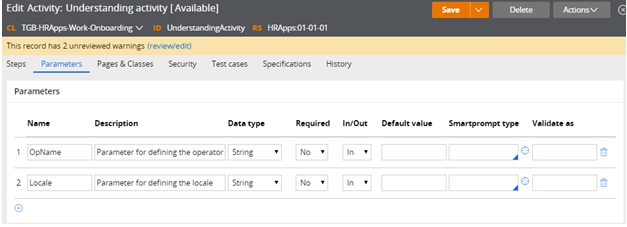
On the Parameters tab define the parameters that identify the operator Id to be updated and the new locale value

On the Pages & Classes tab enter the name of a page that holds the contents of the Opertor ID record that is returned by the Obj-Open method.

On the Steps tab, do the following.
Add an Obj-Open method. This method opens a single record from the database and copies in to a clipboard page.
Enter the values shown below to specify that the value of the .pyUserIdentifier property on the Operator record equals the value of the parameter that is defined on the Parameter tab.


On the Parameters tab define the parameters that identify the operator Id to be updated and the new locale value
On the Pages & Classes tab enter the name of a page that holds the contents of the Opertor ID record that is returned by the Obj-Open method.

On the Steps tab, do the following.
Enter the values shown below to specify that the value of the .pyUserIdentifier property on the Operator record equals the value of the parameter that is defined on the Parameter tab.

Note : Methods that return data from an object (such as Obj-Browse and Obj-Open) .Put the returned data on the step page.
If your application updates and saves the instance select the lock check box to prevent other requestors from updating the instance while your requestor is using it.
Add a Property-Set method to update the .pyUseLocale property and two other properties. List the Step page again. This provides context for the properties that are selected so you do not need to provide the page name before the period that precedes the property name.
Note: @CurrentDateTime() is a standard function rule that returns the current system date and time.

Note: For activities that are used in flow processing, do not include a Commit step. Built-in activities contain Commit methods at the appropriate places.

At this point, you can test the activity. After you run the activity, you can see the updated data on the Operator ID rule form. To help with testing, include a Show-Page method to display the Operator page contents before or after the Property-Set step.
Testing the example
To test the activity, do the following steps:
- Click Actions > Run.
- Notice the parameter names; these are the names that you defined on the parameters tab.
- Enter a value for each parameter.
- Click Run to start the activity.

Run parameters
When the processing reaches the Show-Page step, the page contents appear as an XML document in a browser window.
The page output appears as shown below. Notice the pyUserIdentifier and the updated pyUseLocale values.

Note: Remove the Operator page from the clipboard by adding a Page-Remove method. This frees up memory that is no longer needed. In the Step page field, enter the name of the page to be removed.
Cheers,
Hope you understand. If you have any queries ask in comment section.
Thanks peers :)


